
Here we are discussing for MVVM architecture with Examples and Dir
ViewModel in Android MVVM
1. What is ViewModel?
A ViewModel is a special Android architecture component used to store and manage UI-related data.
In simple words:
ViewModel = Data holder for the screenIt keeps the data safe when the screen is recreated due to configuration changes like screen rotation.
Example:
Activity / Fragment = UI
ViewModel = UI data + UI logic holder
2. Why Do We Need ViewModel?
In Android, Activity and Fragment can be destroyed and recreated many times.
Common reasons:
- Screen rotation
- Dark mode change
- Language change
- App goes background
- Memory pressure
- Multi-Window mode
Without ViewModel, data may be lost when the screen is recreated.
Example problem:
User opens product screen↓ API call loads product list↓ User rotates phone↓Activity is destroyed↓ New Activity is created↓ Product list may be lost↓ API may call again
With ViewModel:
User opens product screen↓ ViewModel loads product list↓ User rotates phone↓ Activity is recreated↓ Same ViewModel is reusedProduct list remains available
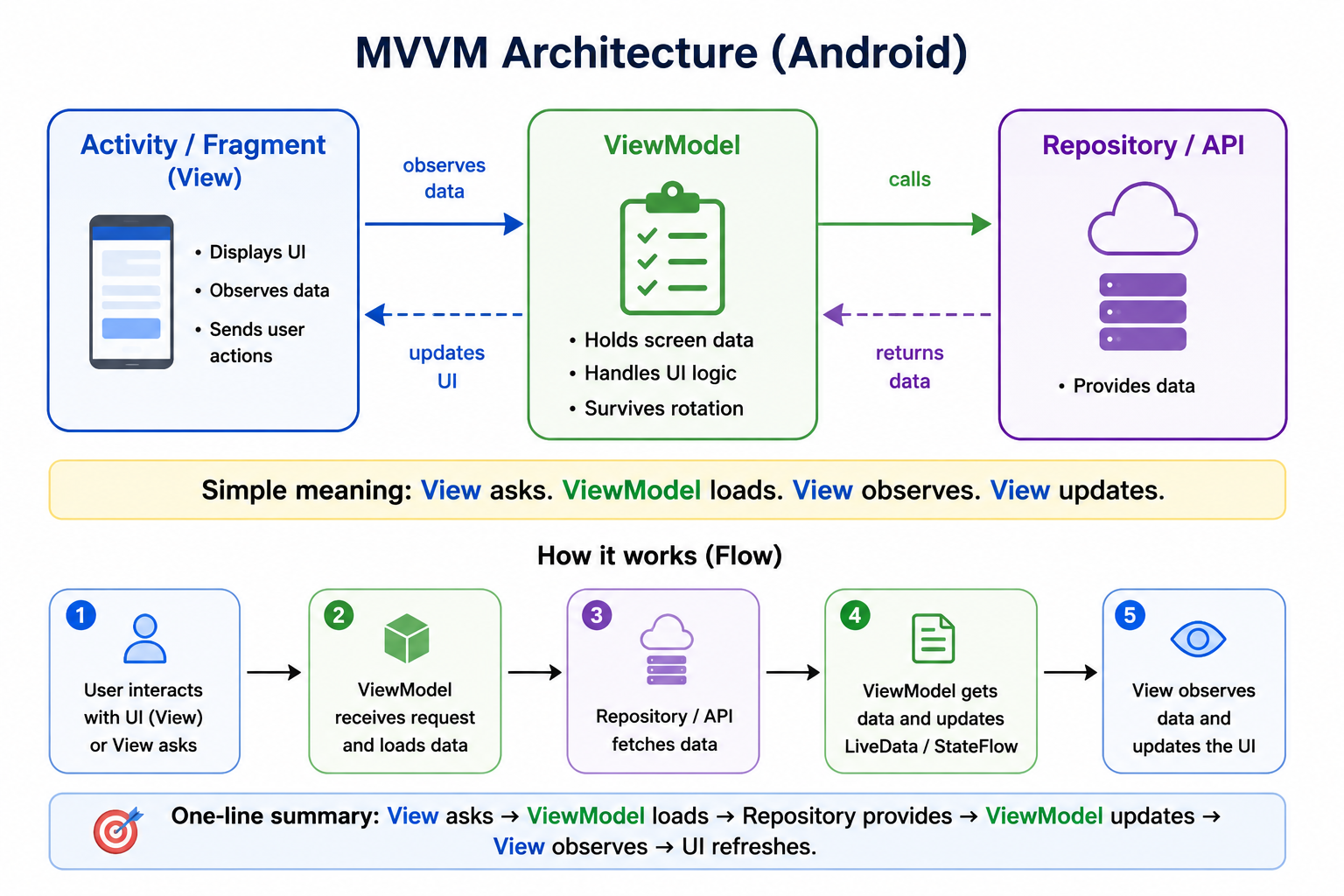
3. Simple ViewModel Diagram
4. ViewModel Real-Life Example
Imagine a classroom.
Student = View
Teacher's notebook = ViewModel
Library = Data source
The student asks a question.
The teacher checks the notebook.
If answer is not available, teacher checks the library.The student only sees the final answer.
Android example:
User clicks button↓ Activity calls ViewModel ↓ ViewModel loads data ↓ Activity observes ViewModel data ↓ UI updates
5. ViewModel Lifecycle
ViewModel lifecycle is different from Activity lifecycle.
Activity lifecycle:
onCreate()
onStart()
onResume()
onPause()
onStop()
onDestroy()
ViewModel lifecycle:
ViewModel created
       ↓
ViewModel keeps data
       ↓
Activity rotates
       ↓
Same ViewModel reused
       ↓
Screen permanently closed
       ↓
ViewModel.onCleared()
---
ViewModel and Screen Rotation
Before Rotation: Activity A ↓ ViewModel ↓ Data available After Rotation: Activity A destroyed↓ Activity A created ↓ Same ViewModel ↓ Same data available
Important point:
Activity is recreated.
ViewModel is not recreated during configuration change.
6. How ViewModel Works Internally
When you create a ViewModel, Android does not simply create it like a normal class every time.
It stores the ViewModel inside a special container called ViewModelStore.
Basic internal flow:
Activity / Fragment ↓ ViewModelProvider ↓ Checks ViewModelStore ↦ If ViewModel exists -> return same object↳ If ViewModel does not exist -> create new object
Diagram:
+-----------------------------+
|        Activity             |
+-----------------------------+
              |
              v
+-----------------------------+
|     ViewModelProvider       |
| Finds or creates ViewModel  |
+-----------------------------+
              |
              v
+-----------------------------+
|       ViewModelStore        |
| Stores ViewModel instance   |
+-----------------------------+
              |
              v
+-----------------------------+
|        MyViewModel          |
| Screen state lives here     |
+-----------------------------+
---
Internal Working During Rotation
1. Activity A is created
2. ViewModelProvider creates MyViewModel
3. MyViewModel is stored in ViewModelStore
4. User rotates screen
5. Activity A is destroyed
6. Activity B is created
7. ViewModelProvider checks ViewModelStore
8. Existing MyViewModel is returned
9. UI receives old data again
That is why ViewModel helps preserve screen data during configuration changes.
---
7. Important Point: ViewModel Does Not Survive Process Death
ViewModel survives configuration changes, but it does not survive process death.
Configuration Change
Example: screen rotation

Activity destroyed
Activity recreated
ViewModel survives
Process Death
Example: Android kills app in background

App process killed
Activity destroyed
ViewModel destroyed
In-memory data lost
So ViewModel is not permanent storage.
For permanent data, use database, DataStore, SharedPreferences, or saved state.---
8. ViewModel Benefits
| Benefit | Explanation |
|---|---|
| Survives configuration changes | Data remains after screen rotation |
| Reduces Activity/Fragment code | UI class becomes clean |
| Separates UI and logic | View handles UI, ViewModel handles UI data |
| Easy to test | ViewModel can be tested without UI |
| Works with LiveData/StateFlow | UI can observe data changes |
| Prevents unnecessary API calls | Same data can be reused after rotation |
| Better lifecycle handling | Data is not tied directly to Activity lifecycle |
---
9. ViewModel Limitations
| Limitation | Explanation |
|---|---|
| Does not survive process death | If app process is killed, ViewModel data is lost |
| Should not hold Activity reference | Can cause memory leak |
| Should not hold View reference | View can be destroyed before ViewModel |
| Not for permanent storage | Use database or local storage |
| Not for heavy business logic | Keep ViewModel focused on UI logic |
| Not automatically thread-safe for all cases | Need proper coroutine/state handling |
| Cannot directly show Toast/Dialog safely | UI should handle these using events |
---
10. What Should ViewModel Contain?
ViewModel should contain:
UI state
Loading state
Error state
User action handling
Calls to repository/API layer
Data transformation for UI
Coroutine calls using viewModelScope
Example:
Product list
Loading true/false
Error message
Search query
Selected filter
Button click handling
---
11. What Should ViewModel Not Contain?
ViewModel should not contain:
Activity reference
Fragment reference
ViewBinding reference
RecyclerView Adapter
Direct Toast code
Direct Dialog code
Large bitmap data
Permanent storage data only in memory
Bad example:
class ProductViewModel(
    private val activity: Activity
) : ViewModel()
This can cause memory leaks.
Better:
class ProductViewModel : ViewModel() {
    // expose state to UI
}
---
12. Basic ViewModel Example
Use Case
User opens product screen.
App loads product list.
UI shows loading.
After data comes, UI shows products.
If error occurs, UI shows error message.
---
Step 1: Create Product Model
data class Product(
    val id: Int,
    val name: String,
    val price: Double
)
---
Step 2: Create Fake Repository
class ProductRepository {

    suspend fun getProducts(): List<Product> {
        delay(1000)

        return listOf(
            Product(1, "Mobile", 15000.0),
            Product(2, "Laptop", 55000.0),
            Product(3, "Headphones", 2000.0)
        )
    }
}
---
Step 3: Create UI State
data class ProductUiState(
    val isLoading: Boolean = false,
    val products: List<Product> = emptyList(),
    val errorMessage: String? = null
)
This class represents the current condition of the screen.
Example states:
Loading screen
Success screen
Error screen
Empty screen
---
Step 4: Create ViewModel
class ProductViewModel : ViewModel() {

    private val repository = ProductRepository()

    private val _uiState = MutableStateFlow(ProductUiState())
    val uiState: StateFlow<ProductUiState> = _uiState.asStateFlow()

    fun loadProducts() {
        viewModelScope.launch {
            try {
                _uiState.value = ProductUiState(
                    isLoading = true
                )

                val products = repository.getProducts()

                _uiState.value = ProductUiState(
                    isLoading = false,
                    products = products
                )

            } catch (e: Exception) {
                _uiState.value = ProductUiState(
                    isLoading = false,
                    errorMessage = "Something went wrong"
                )
            }
        }
    }
}
---
Step 5: Use ViewModel in Compose UI
@Composable
fun ProductScreen(
    viewModel: ProductViewModel = viewModel()
) {
    val state by viewModel.uiState.collectAsState()

    LaunchedEffect(Unit) {
        viewModel.loadProducts()
    }

    when {
        state.isLoading -> {
            CircularProgressIndicator()
        }

        state.errorMessage != null -> {
            Text(text = state.errorMessage)
        }

        else -> {
            LazyColumn {
                items(state.products) { product ->
                    Text(text = "${product.name} - ₹${product.price}")
                }
            }
        }
    }
}
---
13. Flow of This Example
Screen opens
    |
    v
ProductScreen created
    |
    v
ViewModel object is requested
    |
    v
ViewModel loads products
    |
    v
uiState = Loading
    |
    v
UI shows progress bar
    |
    v
Repository returns product list
    |
    v
uiState = Success
    |
    v
UI shows product list
---
14. Product Screen Diagram
+-----------------------------+
|       ProductScreen         |
|        Compose UI           |
+-----------------------------+
              |
              | calls loadProducts()
              v
+-----------------------------+
|      ProductViewModel       |
| uiState: StateFlow          |
| loadProducts()              |
+-----------------------------+
              |
              | calls getProducts()
              v
+-----------------------------+
|     ProductRepository       |
| returns product list        |
+-----------------------------+
              |
              | data returned
              v
+-----------------------------+
|      ProductViewModel       |
| updates uiState             |
+-----------------------------+
              |
              | UI observes state
              v
+-----------------------------+
|       ProductScreen         |
| renders Loading/Success     |
+-----------------------------+
---
15. Pseudocode for ViewModel
Create ViewModel

Inside ViewModel:
    Create private mutable state
    Create public read-only state

When user performs action:
    Update state to loading

    Try:
        Get data from repository
        Update state with success data

    Catch error:
        Update state with error message

UI:
    Observe state from ViewModel

    If loading:
        Show progress bar

    If success:
        Show data

    If error:
        Show error message
---
16. ViewModel with Button Click Example
Use case:
User clicks Refresh button.
ViewModel reloads product list.
UI updates automatically.
ViewModel:
class ProductViewModel : ViewModel() {

    private val repository = ProductRepository()

    private val _uiState = MutableStateFlow(ProductUiState())
    val uiState = _uiState.asStateFlow()

    fun onRefreshClicked() {
        loadProducts()
    }

    private fun loadProducts() {
        viewModelScope.launch {
            _uiState.value = _uiState.value.copy(
                isLoading = true,
                errorMessage = null
            )

            try {
                val products = repository.getProducts()

                _uiState.value = _uiState.value.copy(
                    isLoading = false,
                    products = products
                )

            } catch (e: Exception) {
                _uiState.value = _uiState.value.copy(
                    isLoading = false,
                    errorMessage = "Unable to refresh products"
                )
            }
        }
    }
}
UI:
Button(

        viewModel.onRefreshClicked()
    }
) {
    Text("Refresh")
}
Flow:
User clicks Refresh
        |
        v
View calls viewModel.onRefreshClicked()
        |
        v
ViewModel calls loadProducts()
        |
        v
State changes to Loading
        |
        v
UI shows loader
        |
        v
Data loaded
        |
        v
State changes to Success
        |
        v
UI shows updated list
---
17. ViewModel with LiveData Example
Older Android projects often use LiveData.
ViewModel:
class ProductViewModel : ViewModel() {

    private val repository = ProductRepository()

    private val _products = MutableLiveData<List<Product>>()
    val products: LiveData<List<Product>> = _products

    fun loadProducts() {
        viewModelScope.launch {
            val result = repository.getProducts()
            _products.value = result
        }
    }
}
Activity:
class ProductActivity : AppCompatActivity() {

    private val viewModel: ProductViewModel by viewModels()

    override fun onCreate(savedInstanceState: Bundle?) {
        super.onCreate(savedInstanceState)

        viewModel.products.observe(this) { products ->
            // update RecyclerView adapter
        }

        viewModel.loadProducts()
    }
}
---
18. ViewModel with StateFlow Example
Modern Kotlin-based projects commonly use StateFlow.
ViewModel:
class ProductViewModel : ViewModel() {

    private val _count = MutableStateFlow(0)
    val count = _count.asStateFlow()

    fun increaseCount() {
        _count.value = _count.value + 1
    }
}
Compose:
@Composable
fun CounterScreen(
    viewModel: ProductViewModel = viewModel()
) {
    val count by viewModel.count.collectAsState()

    Column {
        Text(text = "Count: $count")

        Button(

                viewModel.increaseCount()
            }
        ) {
            Text("Increase")
        }
    }
}
---
19. ViewModel and viewModelScope
viewModelScope is used to launch coroutines inside ViewModel.
Example:
viewModelScope.launch {
    val products = repository.getProducts()
}
Why use viewModelScope?
Because it is automatically cancelled when ViewModel is cleared.
Flow:
ViewModel active
      |
      v
Coroutine running
      |
      v
Screen closed permanently
      |
      v
ViewModel.onCleared()
      |
      v
viewModelScope cancelled
This helps avoid memory leaks and unnecessary background work.
---
# 20. onCleared() in ViewModelonCleared() is called when ViewModel is permanently destroyed.
Example:
class ProductViewModel : ViewModel() {

    override fun onCleared() {
        super.onCleared()

        // clean resources if required
    }
}
When is it called?
User presses back and screen is removed
Activity finishes permanently
Navigation graph is cleared
When is it not called?
Simple screen rotation
Configuration change
---
21. ViewModel Creation Methods
Activity ViewModel
private val viewModel: ProductViewModel by viewModels()Fragment ViewModel
private val viewModel: ProductViewModel by viewModels()Shared ViewModel Between Fragments
private val viewModel: ProductViewModel by activityViewModels()Use shared ViewModel when two fragments need to share screen data.
Example:
ProductListFragment
ProductFilterFragment

Both can share the same ProductViewModel using activityViewModels()
---
22. ViewModel Internal Scope Diagram
Activity Scope
    |
    +-- Activity ViewModel


Fragment Scope
    |
    +-- Fragment ViewModel


Activity Shared Scope
    |
    +-- Shared ViewModel used by multiple fragments


Navigation Graph Scope
    |
    +-- ViewModel shared inside one navigation graph
---
23. Common Mistakes with ViewModel
Mistake 1: Holding Activity Reference
Bad:
class MyViewModel(
    val activity: Activity
) : ViewModel()
Problem:
Activity may be destroyed.
ViewModel may still live.
Old Activity cannot be garbage collected.
Memory leak happens.
---
Mistake 2: Holding ViewBinding in ViewModel
Bad:
class MyViewModel : ViewModel() {
    lateinit var binding: ActivityMainBinding
}
Problem:
ViewModel should not know about UI views.
View can be destroyed anytime.
---
Mistake 3: Doing UI Work in ViewModel
Bad:
Toast.makeText(context, "Success", Toast.LENGTH_SHORT).show()Better:
ViewModel emits event.
Activity/Fragment shows Toast.
---
Mistake 4: Using ViewModel as Permanent Storage
Bad idea:
Store login token only in ViewModelWhy?
App process death will clear ViewModel.
Token will be lost.
Better:
Use DataStore, SharedPreferences, or database.---
24. ViewModel Interview Points
What is ViewModel?
ViewModel is an Android architecture component that stores and manages UI-related data in a lifecycle-conscious way. It survives configuration changes and helps separate UI logic from Activity or Fragment.---
Why is ViewModel used?
ViewModel is used to keep UI data safe during configuration changes, reduce logic inside Activity/Fragment, expose observable state to UI, and make screen logic easier to test.---
Does ViewModel survive process death?
No. ViewModel survives configuration changes like rotation, but it does not survive process death. If Android kills the app process, ViewModel is destroyed.---
Why should ViewModel not hold Activity context?
Because ViewModel can live longer than Activity during configuration changes. If ViewModel holds Activity reference, the old Activity may not be garbage collected, causing memory leak.---
What is viewModelScope?
viewModelScope is a coroutine scope tied to ViewModel lifecycle. Any coroutine launched inside it is automatically cancelled when ViewModel is cleared.---
25. Final Summary
ViewModel is the brain of a screen in MVVM. It stores UI-related data, handles user actions, exposes state to the UI, and survives configuration changes like screen rotation.
The Activity or Fragment should only show UI and send user actions to the ViewModel. The ViewModel should update state, and the UI should observe that state.
Simple memory trick:
Activity/Fragment shows.
ViewModel stores.
Repository provides.
Another easy line:
ViewModel keeps screen data safe when Android recreates the screen.ViewModel is powerful, but it has limits. It does not survive process death, should not hold Activity or View references, and should not be used as permanent storage. For best results, use ViewModel with StateFlow or LiveData, keep UI state immutable, and use viewModelScope for coroutine work.